Web App Design: How to Build Applications Users Actually Enjoy Using
Designing a web app isn’t just about visuals. It’s about creating clear workflows, intuitive navigation, and fast interfaces that help users complete tasks efficiently.Unlike marketing websites, web apps are built for action - managing data, automating workflows, and improving productivity.
In this guide, you’ll learn the key principles, best practices, and real-world examples behind modern web app design.

What Is Web App Design?
Web app design is the process of creating the structure, layout, and user experience of a web-based application. It focuses on how users interact with data, complete tasks, and move through workflows inside a browser.
Unlike traditional websites that primarily deliver content, web applications are built for interaction. Users log in, manage information, submit forms, analyze dashboards, and perform specific actions. Because of this, web app design prioritizes usability, clarity, and efficiency over decoration.
This is especially important for internal tools and admin panels, where teams work with large amounts of data every day. Platforms like Jet Admin help teams design these data-driven applications faster by providing ready-to-use components such as tables, forms, filters, and role-based views - while still allowing full customization.
Core Principles of Web App Design
Designing a successful web app isn’t about adding more features or visual effects. It’s about creating an interface that makes complex workflows feel simple and intuitive. Below are the core principles behind effective web app design.
1. Clarity Over Decoration
Web applications are built for action. Users should immediately understand what they can do and where to click next. Clean layouts, clear labels, and structured data presentation always matter more than decorative elements.
2. Consistent Design System
Consistency reduces cognitive load. Buttons, forms, tables, and navigation patterns should behave the same across the entire application. Using a structured component system - like the one available in Jet Admin - helps teams maintain visual and functional consistency without redesigning each screen from scratch.
3. Efficient Navigation
Users should reach key actions in as few steps as possible. Clear sidebars, logical menu grouping, and searchable data tables improve usability, especially in data-heavy internal tools.
4. Smart Data Hierarchy
Web apps often contain dashboards, metrics, and large datasets. Important information should stand out visually, while secondary details remain accessible but not overwhelming. Proper spacing, typography, and visual grouping are essential.
5. Feedback and System States
Good web app design always communicates what’s happening. Loading states, success messages, error alerts, and empty states prevent confusion and improve user confidence.
When building internal tools with platforms like Jet Admin, many of these best practices are supported by default - allowing teams to focus more on workflows and logic rather than rebuilding UI patterns from scratch.
How to Design a Web App with No-Code
Designing a web app traditionally requires designers, frontend developers, and weeks of iteration. But today, no-code and low-code platforms allow teams to build fully functional web applications much faster.
Instead of starting from a blank canvas, teams can use pre-built components such as tables, forms, dashboards, and filters -then customize layouts and workflows according to their needs.
With platforms like Jet Admin, teams can:
Connect databases and APIs
Build workflows to streamline internal processes
Create automations to reduce manual work and improve efficiency
Implement AI agents to automate tasks, enhance decision-making, and assist users
Create role-based access control
Design dashboards with minimal setup
Customize UI components without rebuilding everything
This approach significantly reduces development time while still following modern web app design principles like consistency, clarity, and usability.
No-code doesn’t mean limited design. It means focusing on workflows and user experience instead of rebuilding common UI patterns from scratch.
Real-World Web App Design Examples
Studying successful web applications helps understand what effective web app design looks like in practice. Below are well-known platforms that demonstrate strong usability, structure, and data presentation.
1. Notion
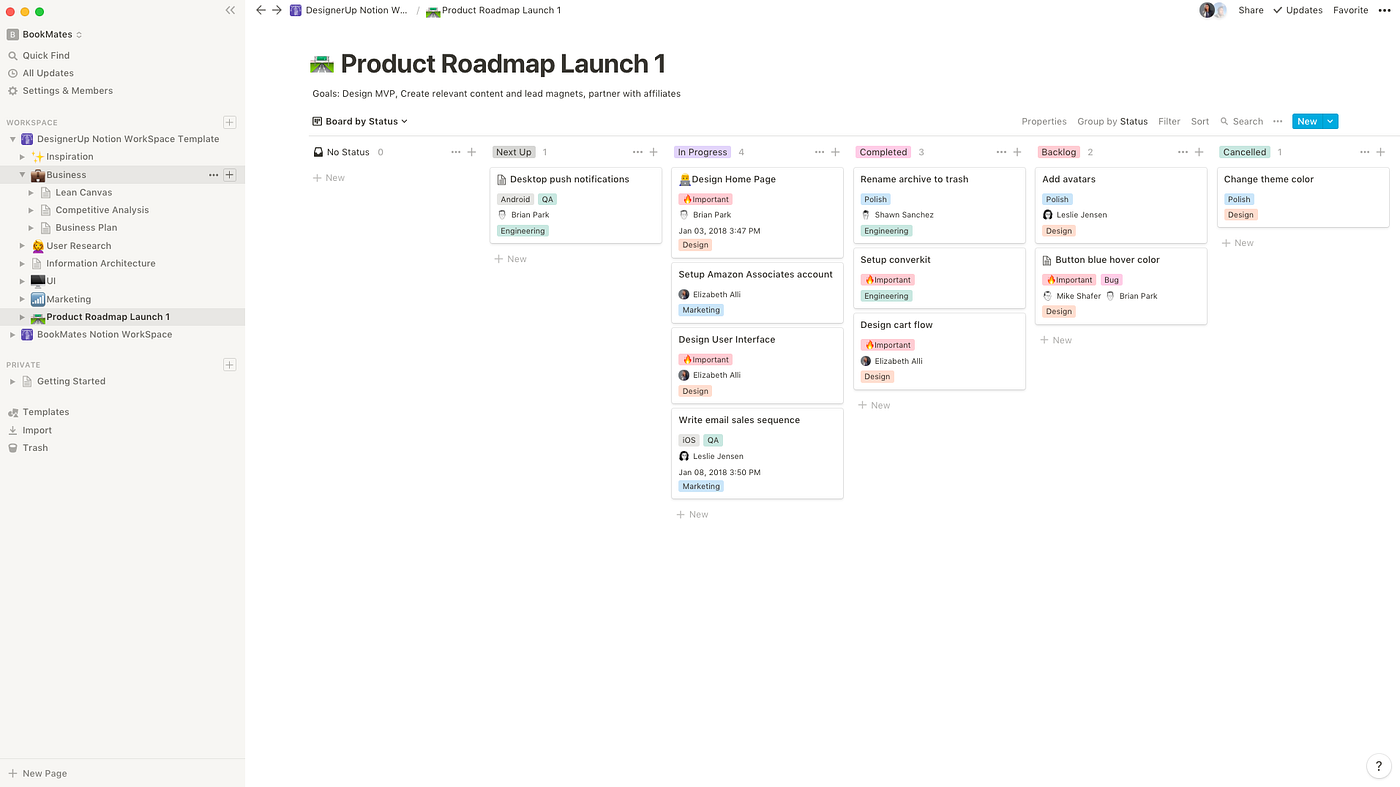
Notion is a great example of clean web app design.
When you open Notion, nothing feels overwhelming. There’s plenty of white space, clear text, and simple navigation on the left. Even though it can handle databases, boards, and documents, the interface stays calm and structured.
The design doesn’t try to impress with decoration. It focuses on helping you think clearly and organize information without distractions.
2. Intercom
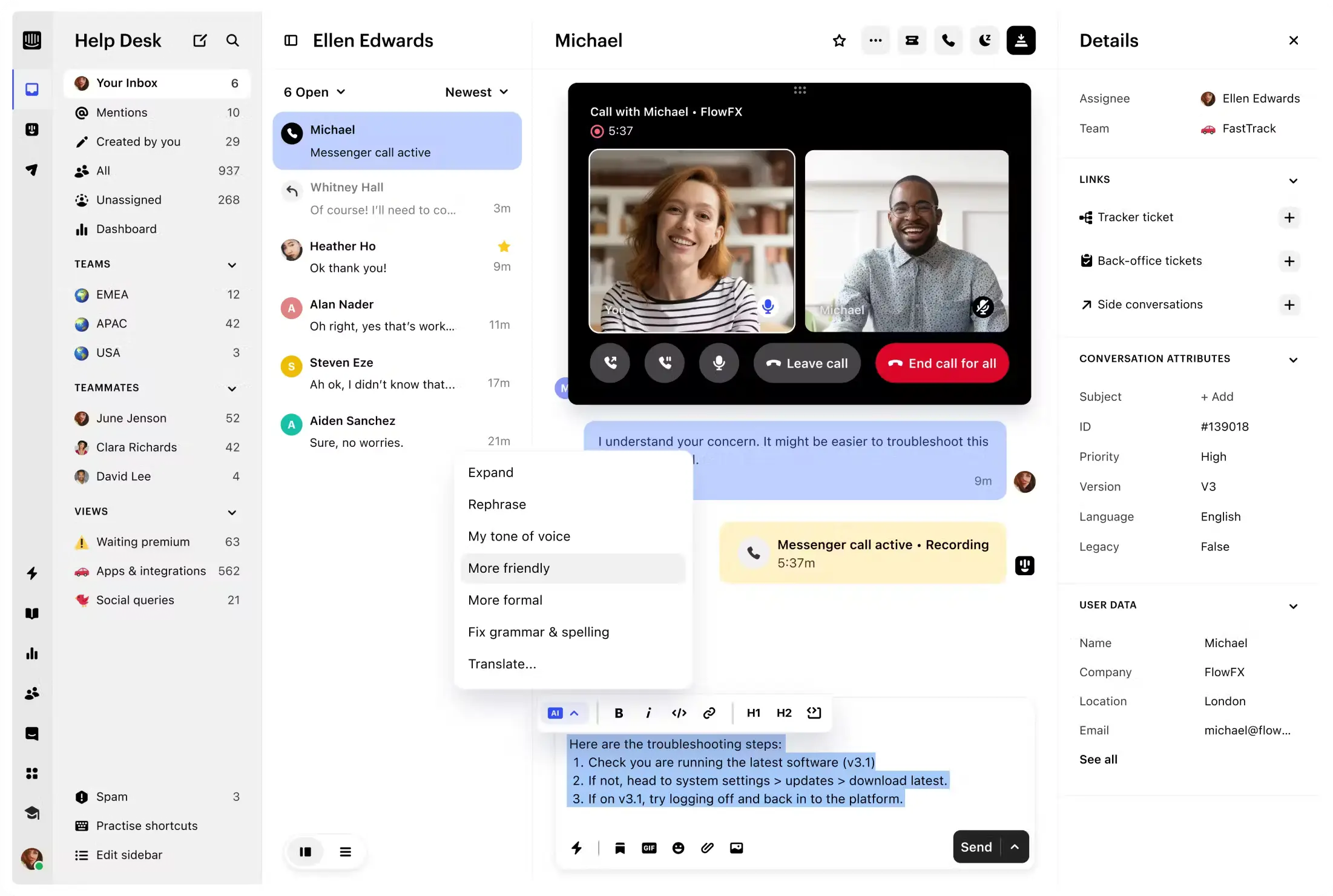
Intercom is a great example of web app design built around conversations.
When you open Intercom, the layout feels structured and focused. The conversation panel is central, while user details appear clearly on the side. Nothing competes for attention.
The design supports fast decision-making:
Clear action buttons
Organized customer data
Logical navigation
It shows how web app design can simplify complex workflows like support, automation, and user management.
3. Spotify Web Player

The Spotify Web Player shows how powerful web app design can feel effortless.
Even though Spotify manages huge amounts of content - playlists, albums, podcasts - the interface never feels overwhelming. The layout stays consistent as you move through the app, so you always understand where you are and what you can do next.
There’s a strong sense of structure. Navigation is predictable, actions are easy to find, and the visual hierarchy guides your attention naturally. Nothing competes for attention, and nothing feels accidental.
That’s what good web app design does. It handles complexity behind the scenes while making the user experience feel simple.
4. Canva
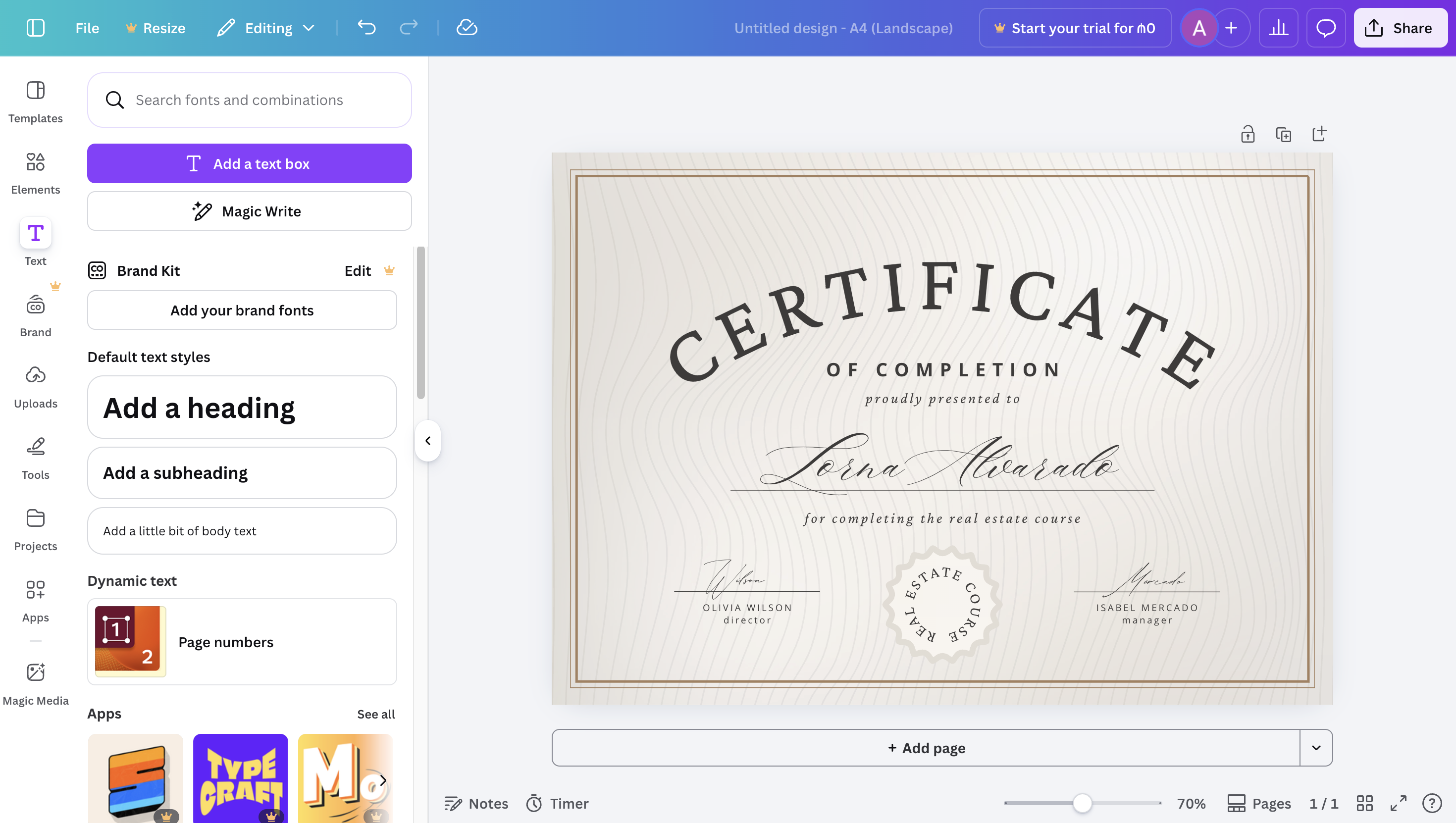
Canva is a powerful example of web app design that makes complex tools feel accessible.
Design software used to feel intimidating. Multiple panels, technical controls, and confusing layouts often created friction for new users. Canva changed that by simplifying the interface without removing functionality.
The editor keeps the canvas in the center, tools on the side, and actions clearly visible at the top. Everything feels intentional and easy to understand. Even beginners can start designing within minutes.
What makes Canva’s web app design strong is how it balances power and simplicity. Advanced features are there when you need them, but they never overwhelm the main workflow.
For internal tools and admin panels, the same principle applies. Whether you're building dashboards or operational apps with Jet Admin, the goal is the same: reduce friction and guide users naturally through their tasks.
5. Slack
.png)
Slack is a strong example of structured and scalable web app design.
At first glance, Slack looks simple. A sidebar with channels, a main conversation area, and a top bar for search and settings. But behind that simplicity is a complex system handling messages, files, integrations, and workflows.
What makes Slack’s design effective is its consistency. No matter how many channels or apps you connect, the structure stays the same. You always know where to look for conversations, how to switch spaces, and where to find tools.
Slack also handles real-time interaction smoothly. Messages update instantly, notifications are clear, and the interface never feels cluttered - even in large teams.It’s a reminder that strong web app design isn’t about adding more features to the screen. It’s about organizing information in a way that feels predictable and easy to navigate.
The same mindset applies when building internal tools with Jet Admin - especially when teams rely on fast collaboration and clear workflows.
Frequently Asked Questions About Web App Design
What is web app design?
Web app design is the process of creating the layout, structure, and user experience of a web-based application. It focuses on how users interact with data, complete tasks, and move through workflows inside a browser.
How is web app design different from website design?
Website design usually focuses on presenting information or marketing content. Web app design focuses on interaction. Users log in, manage data, submit forms, track analytics, or collaborate with teams. Because of this, usability and workflow clarity are more important than decoration.
What are the key principles of good web app design?
Good web app design prioritizes clarity, consistency, simple navigation, strong visual hierarchy, and clear system feedback (like loading states and error messages). The goal is to reduce friction and help users complete tasks efficiently.
How do you design a web app?
You start by defining user goals and workflows. Then you create wireframes, organize data structure, design UI components, and test the experience. Many teams now use low-code platforms like Jet Admin to speed up the process while keeping modern design standards.
What tools are used to create a web app?
Web apps are created using different tools depending on the approach. Designers often use tools like Figma to plan layouts and user interfaces. Developers use frameworks such as React or Vue to build the frontend and connect it to databases and APIs.
Today, many teams use no-code and low-code platforms like Jet Admin to build web apps faster. These platforms allow you to connect data, create dashboards, and design workflows without writing large amounts of code, which significantly reduces development time.