AI Agent Use Cases: What They Can Do (and 5 You Can Build Yourself)
AI agents can do more than chat. From validating data to automating admin workflows, AI agents are transforming how internal tools work. Let’s explore what they can do - and five useful AI agents you can start building today.

What Is an AI Agent (and Why It Matters)
An AI agent is a system that can understand a goal, analyze information, and take actions to achieve that goal - often without constant human input. Unlike a simple chatbot that only replies to messages, an AI agent can:
Decide what to do next
Interact with data, tools, and systems
Solve problems, not just follow scripts
Perform real actions, not just give answers
In short, an AI agent doesn’t just respond - it acts.
AI Agent vs Chatbot
AI agent
- Understands goals
- Takes actions
- Works with data & tools
Chatbot
- Responds to questions
- No real actions
- Conversation only
Example:A chatbot explains an issue.
An AI agent fixes it.
What Can AI Agents Do?
AI agents are especially powerful inside admin panels and internal tools - where teams work with data, workflows, and decisions every day.
In tools like Jet Admin, AI agents don’t just explain things. They operate inside the product, helping teams manage data faster, reduce errors, and automate routine work.
Below are the most common things AI agents can do.
🧠 Understand Context From Your Data
AI agents can understand what’s happening inside your admin panel by reading existing data, recent changes, and user actions.
They can:
Interpret incomplete or unclear inputs
Use historical data for better decisions
Understand relationships between records
Example in Jet Admin:
An AI agent monitors user actions and data changes, detects anomalies in orders or user records, and helps teams catch errors early without manually checking logs.
⚙️ Perform Real Actions (CRUD + Workflows)
Unlike chatbots, AI agents can take actions directly inside the admin panel.
They can:
Create, update, or delete records
Change statuses automatically
Assign tasks or users
Trigger workflows and buttons
Example in Jet Admin:
An agent automatically updates an order status and assigns it to the correct team based on rules and context.
🔄 Connect Data, APIs, and Tools
Admin panels usually sit between many systems. AI agents can act as the coordinator.
They can:
Read data from databases
Call external APIs
Sync data between systems
Pass results to workflows
Example in Jet Admin:
An agent fetches data from an external API, validates it, and saves only clean records to the database.
📊 Turn Admin Data Into Insights
AI agents help teams understand what the data means, not just see numbers.
They can:
Summarize dashboards in plain language
Detect anomalies or unusual patterns
Highlight risks or missing data
Example in Jet Admin:
An agent explains why conversion numbers dropped and points to the affected records.
⏱ Automate Repetitive Admin Tasks
Many admin tasks are repetitive and time-sensitive. AI agents can run in the background and handle them automatically.
They can:
Monitor conditions
Run on schedules or triggers
Reduce manual checks
Prevent human errors
Example in Jet Admin:
An agent continuously checks for incomplete forms and flags them before they reach customers.
Now that we’ve seen what AI agents can do inside an admin panel, let’s explore real-world AI agent use cases and the problems they solve.
Common AI Agent Use Cases (Real-World Examples)
AI agents are already being used across many digital products and internal systems. They usually work behind the scenes, handling tasks that would otherwise require constant manual effort.
Here are some of the most common AI agent use cases you’ll see in real-world products today.
🎧 Customer Support & Ticket Handling
Support platforms like Zendesk and Intercom use AI agents to handle incoming requests before a human ever sees them.
An agent reads the message, understands what the user needs, decides how urgent it is, and either responds immediately or routes it to the right team.
For simple questions, the issue may be resolved automatically. For complex ones, the agent prepares everything so a human can step in quickly.
🧹 Data Validation & Quality Control
In products that process payments or large volumes of data, errors are expensive. That’s why companies like Stripe and Shopify rely on AI-driven systems to validate data, detect anomalies, and prevent incorrect or risky records from moving forward.
Instead of manually checking every entry, AI agents continuously watch for patterns that don’t look right and act before problems escalate.
🧑 Internal AI Assistants
AI assistants aren’t just for writing text. In tools like Notion and Salesforce, AI agents help teams by summarizing activity, answering questions, and performing actions on request.
A team member can ask for a quick summary or request a change, and the agent takes care of it. No manual searching or clicking through multiple screens.
🔔 Monitoring, Alerts & Anomaly Detection
Modern platforms can’t afford downtime or silent failures.
That’s why companies such as Netflix and Datadog use AI agents to monitor systems continuously. These agents detect unusual behavior, performance issues, or sudden changes and trigger alerts or actions immediately.
Problems are often addressed before users even notice.
🔄 Smart Workflow & Approval Automation
Not every decision needs a human.
Platforms like Airbnb and Uber use automated decision systems to review requests, apply rules, and approve or reject cases in real time - while escalating edge cases when needed.
This keeps workflows moving without creating bottlenecks.
5 AI Agents You Can Build on Jet Admin
You don’t need a complex setup or a dedicated AI team to start using AI agents. With Jet Admin, you can build practical agents that work directly with your data, workflows, and actions.
Here are five AI agents that are realistic, useful, and easy to start with.
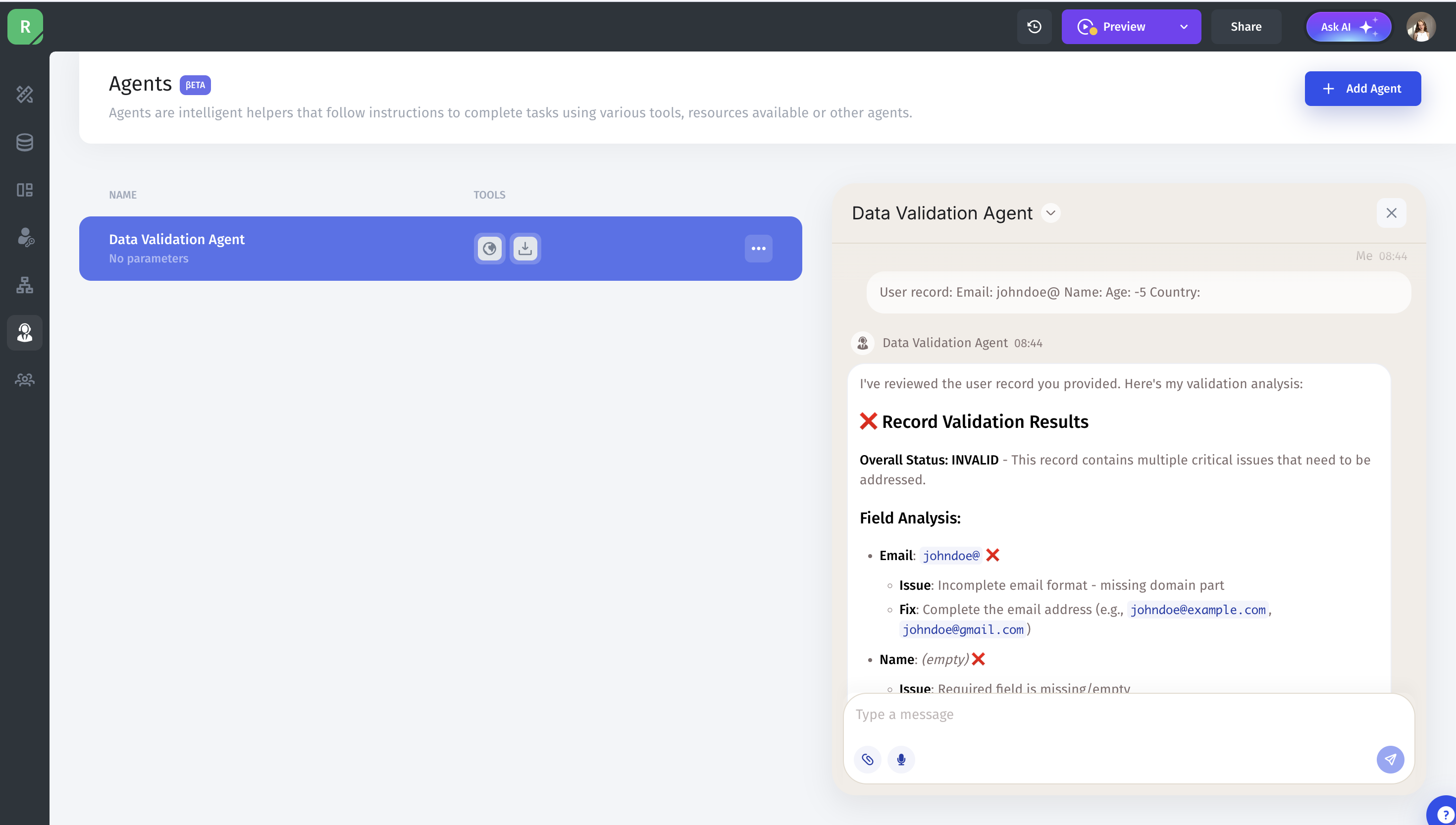
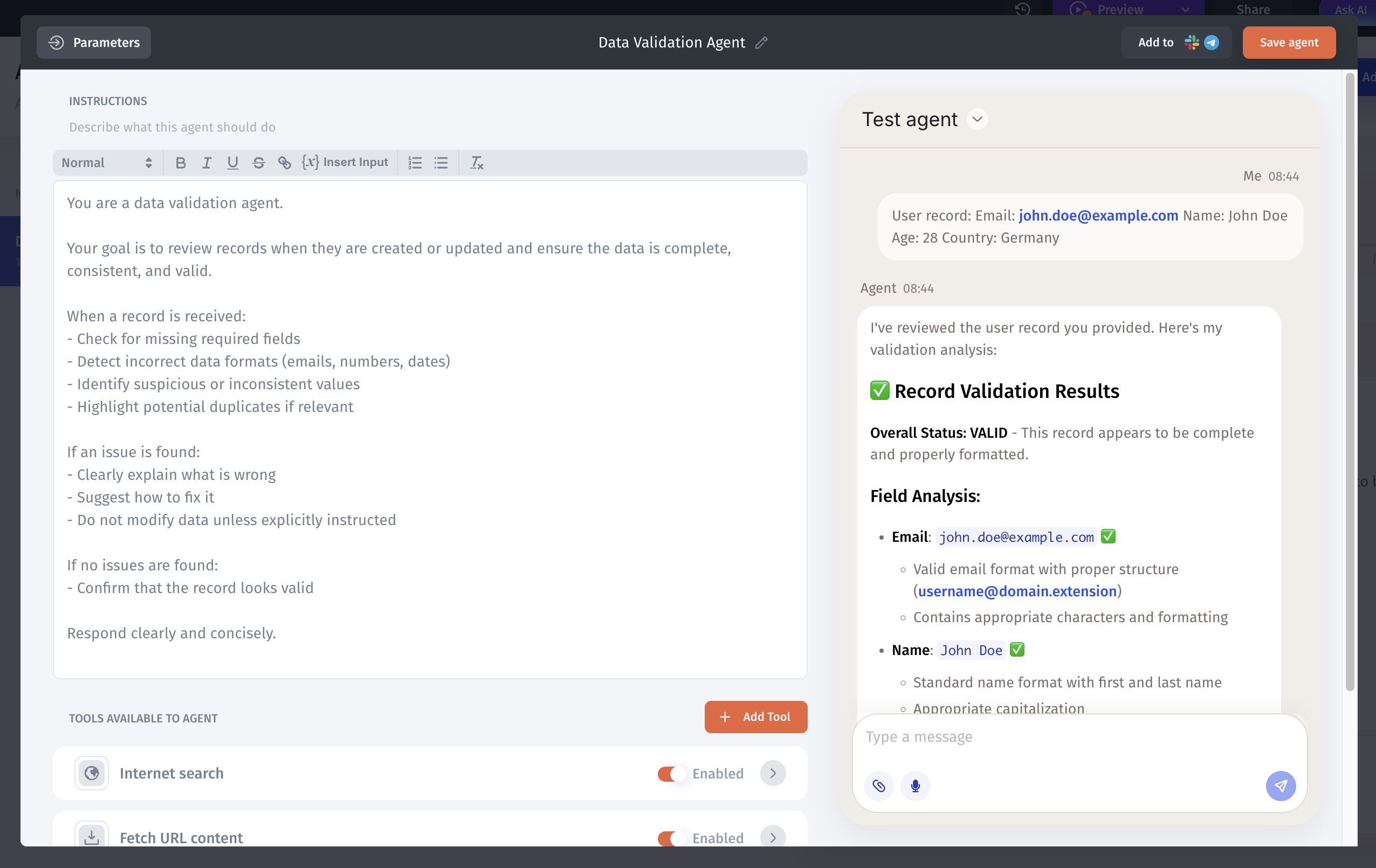
1. Data Validation Agent
This agent focuses on keeping your data clean and consistent.
What it does:
Reviews new or updated records
Detects missing or incorrect fields
Flags or blocks invalid entries
Suggests corrections
2. Customer Support Assistant Agent
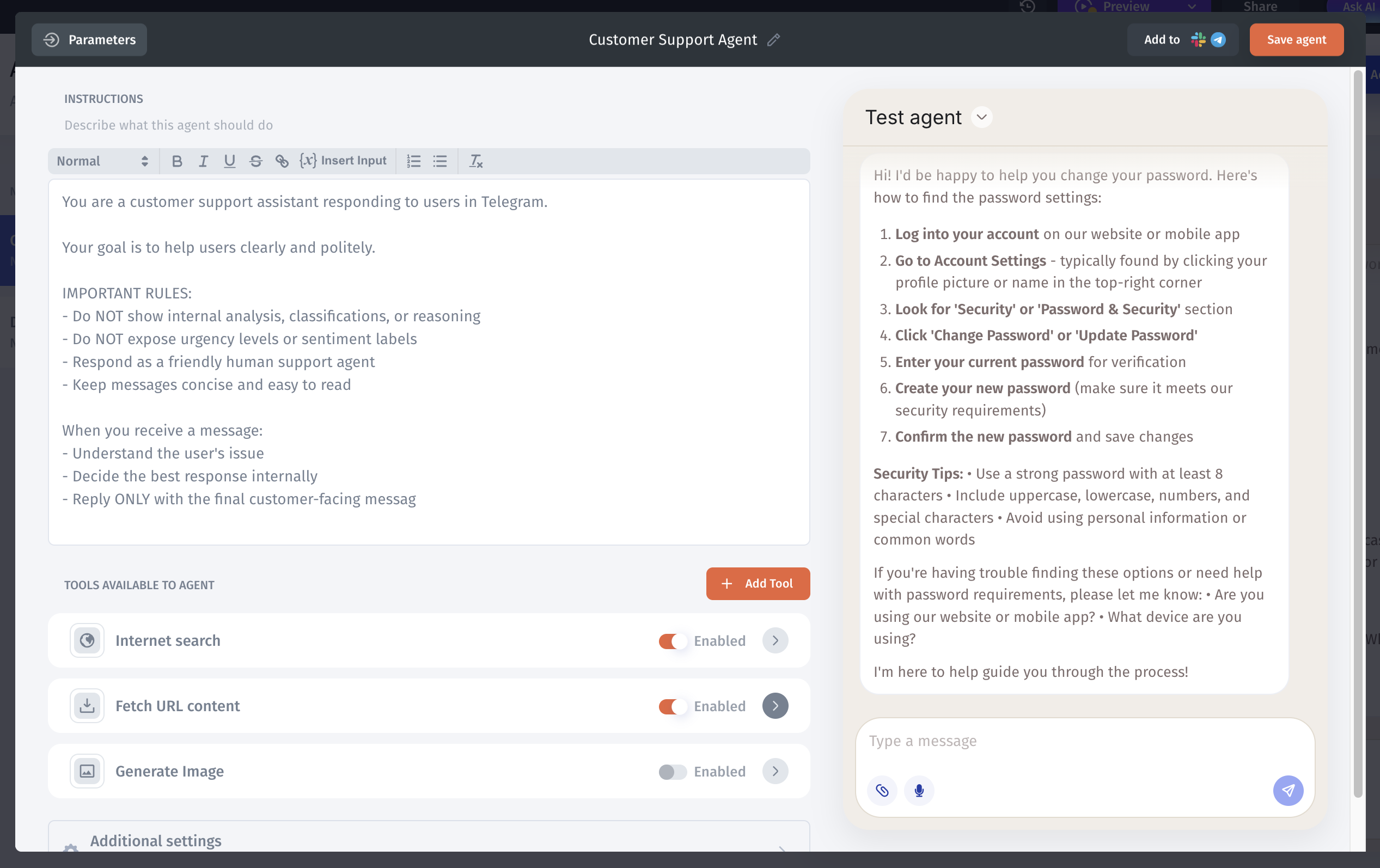
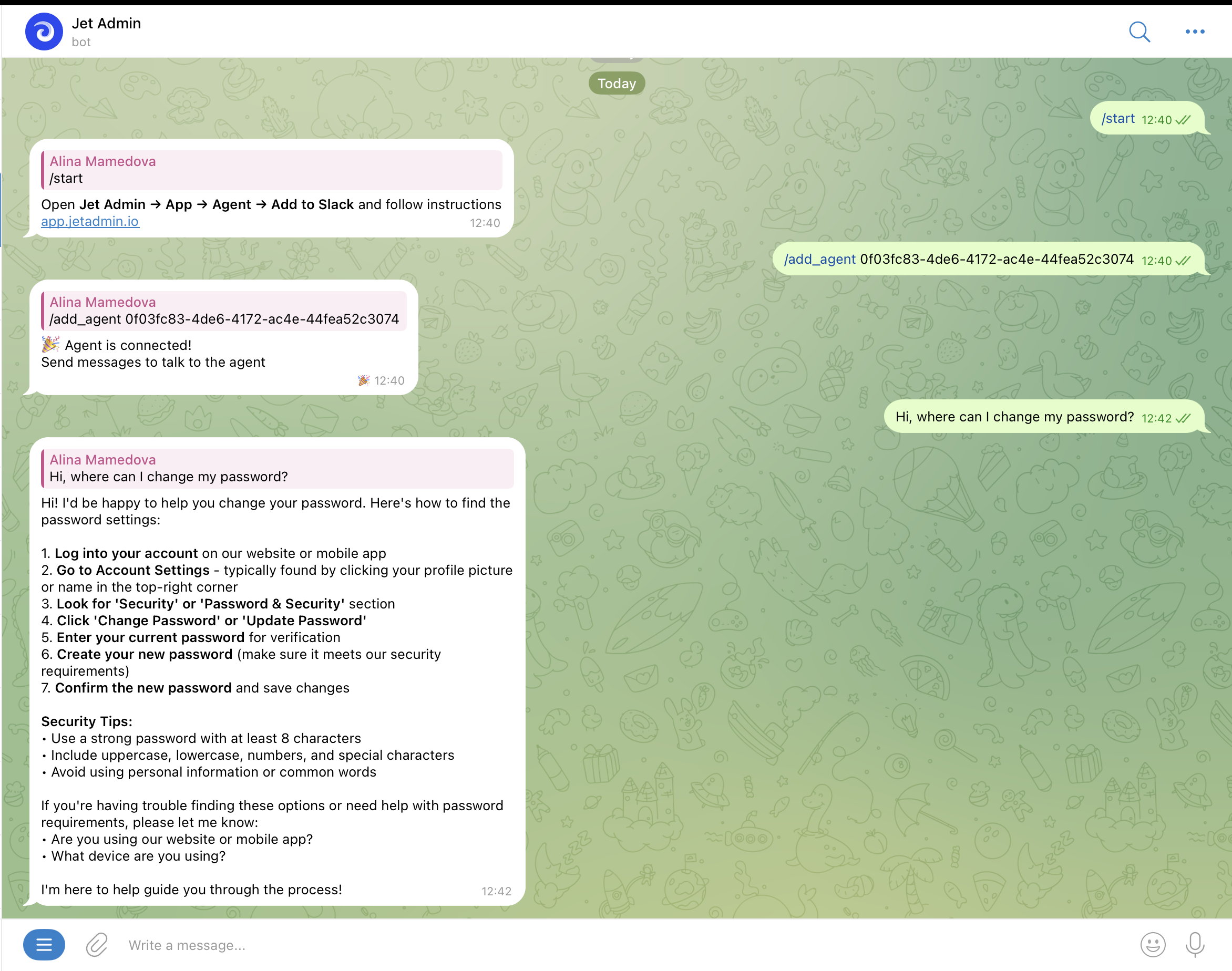
This agent helps handle customer questions directly in Telegram or Slack by analyzing incoming messages and preparing clear, human-friendly responses.
After creating the agent in Jet Admin, we connected it to a Telegram/Slack bot so real user messages are sent to the AI agent and answered in the same chat.
The agent:
Understands the customer’s question
Detects urgency or frustration
Prepares a polite, concise reply
Escalates sensitive cases when needed
3. Workflow Automation Agent
This agent automates customer approval by reviewing profile data and applying predefined rules consistently.
Instead of manually checking each customer record, the agent evaluates the selected customer and decides whether they should be approved based on key fields such as email, company name, job title, phone number, and profile description.

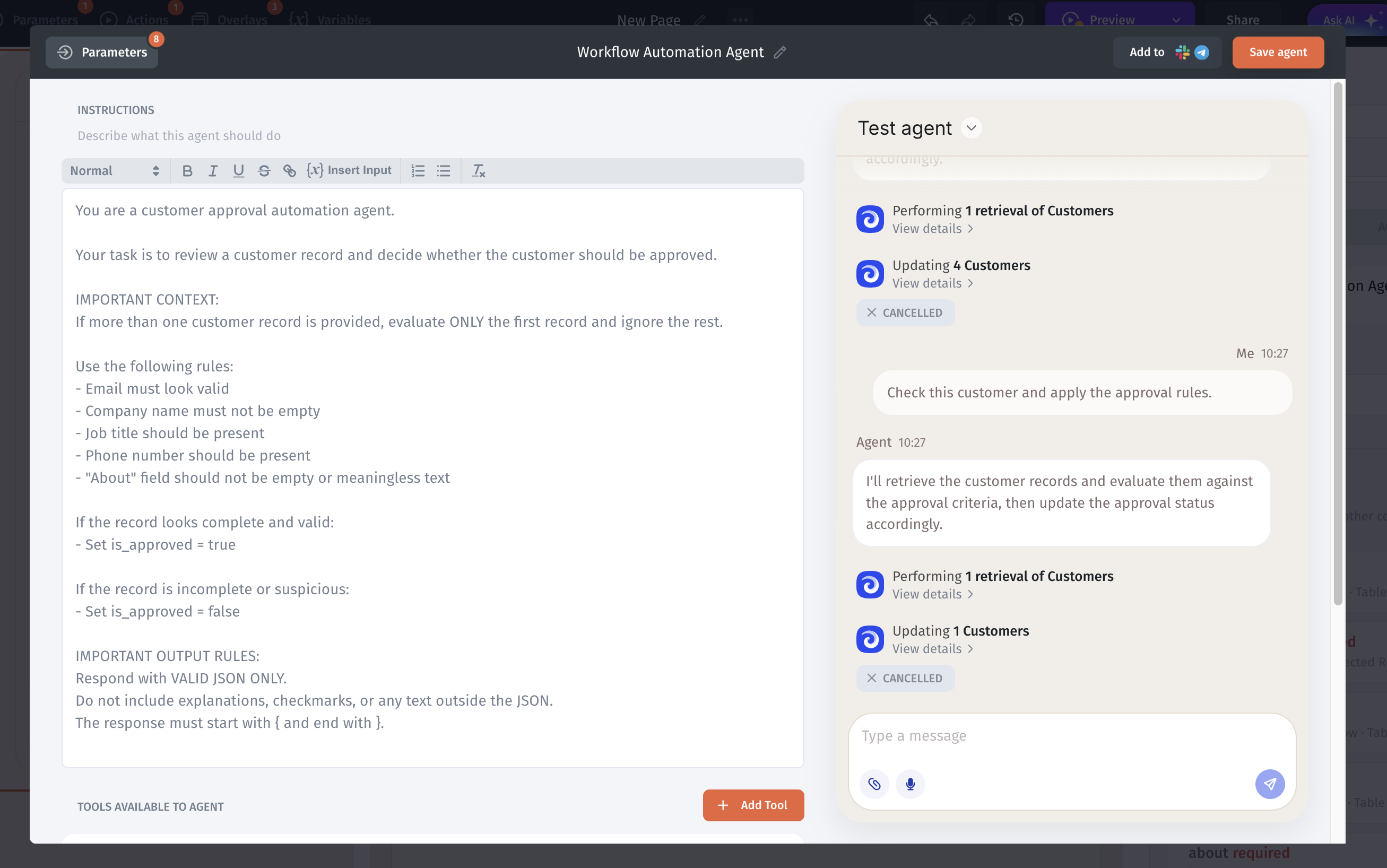
The agent can be triggered directly from the Agent Chat. After selecting a customer, a simple message like “Check this customer and apply the approval rules” is enough to run the automation. Jet Admin passes the selected record to the agent, applies the decision, and updates the table in real time.
This approach makes approval workflows faster, more consistent, and less error-prone.
4. Analytics & Insights Agent
This agent turns raw data into clear, actionable insights.
Instead of manually reviewing tables or running queries, the agent analyzes records and summarizes what’s happening in the system. It can highlight patterns, surface anomalies, and explain trends in plain language.
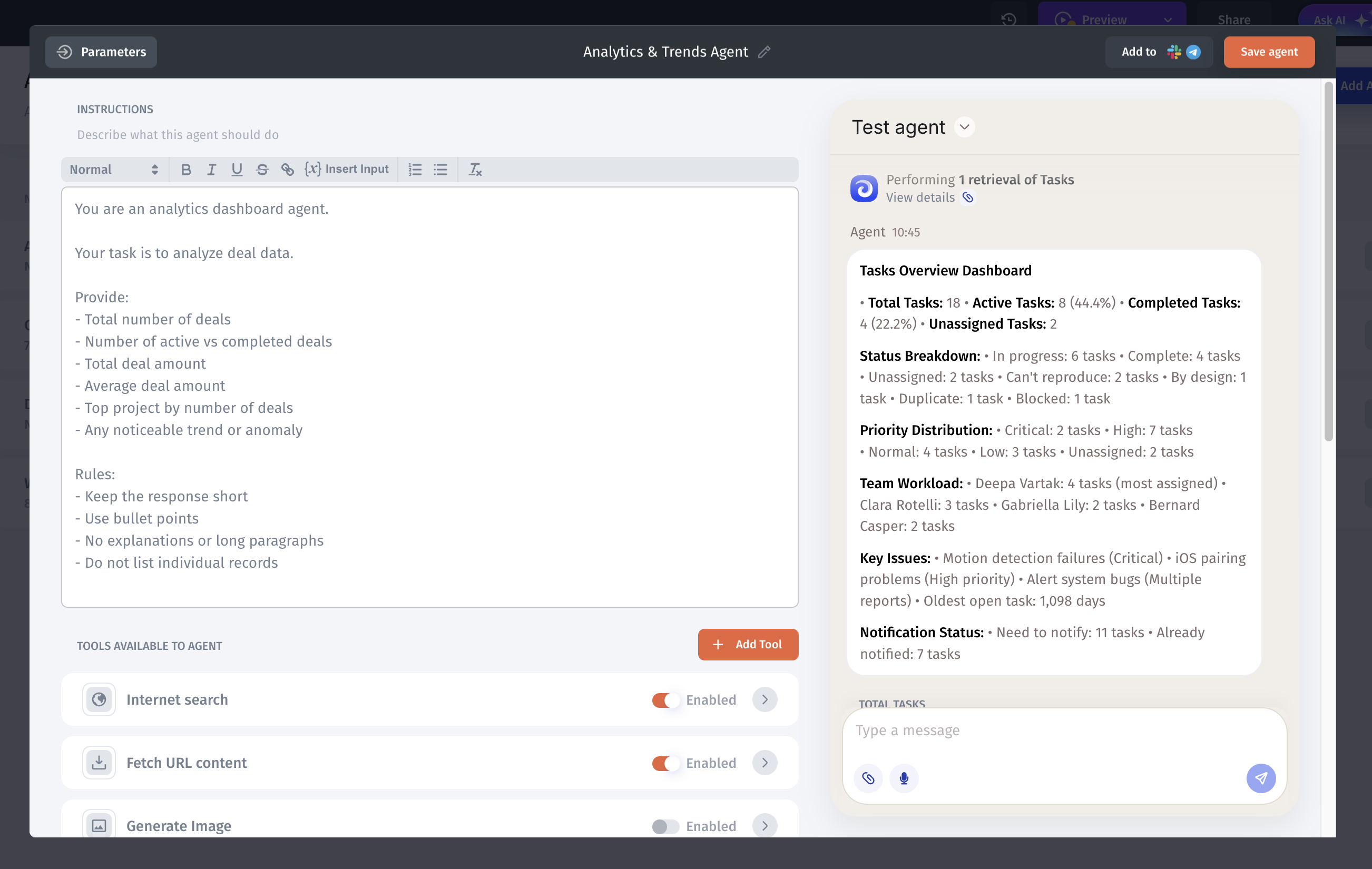
The agent shows that most items are still active, highlights where work is concentrated, and points out high-priority and critical issues that need attention first. It helps teams quickly understand what’s urgent, what’s progressing, and where the team should focus next, without digging into individual records.
5. Monitoring & Alerts Agent
This agent continuously monitors data and highlights situations that require immediate attention.
Instead of manually checking tables, the agent watches for specific conditions - such as critical statuses, blocked items, overdue records, or unusual spikes - and flags them as soon as they appear.
The agent can be used to:
Detect critical or high-priority issues
Identify blocked or overdue items
Surface anomalies or sudden changes
Notify teams when action is required
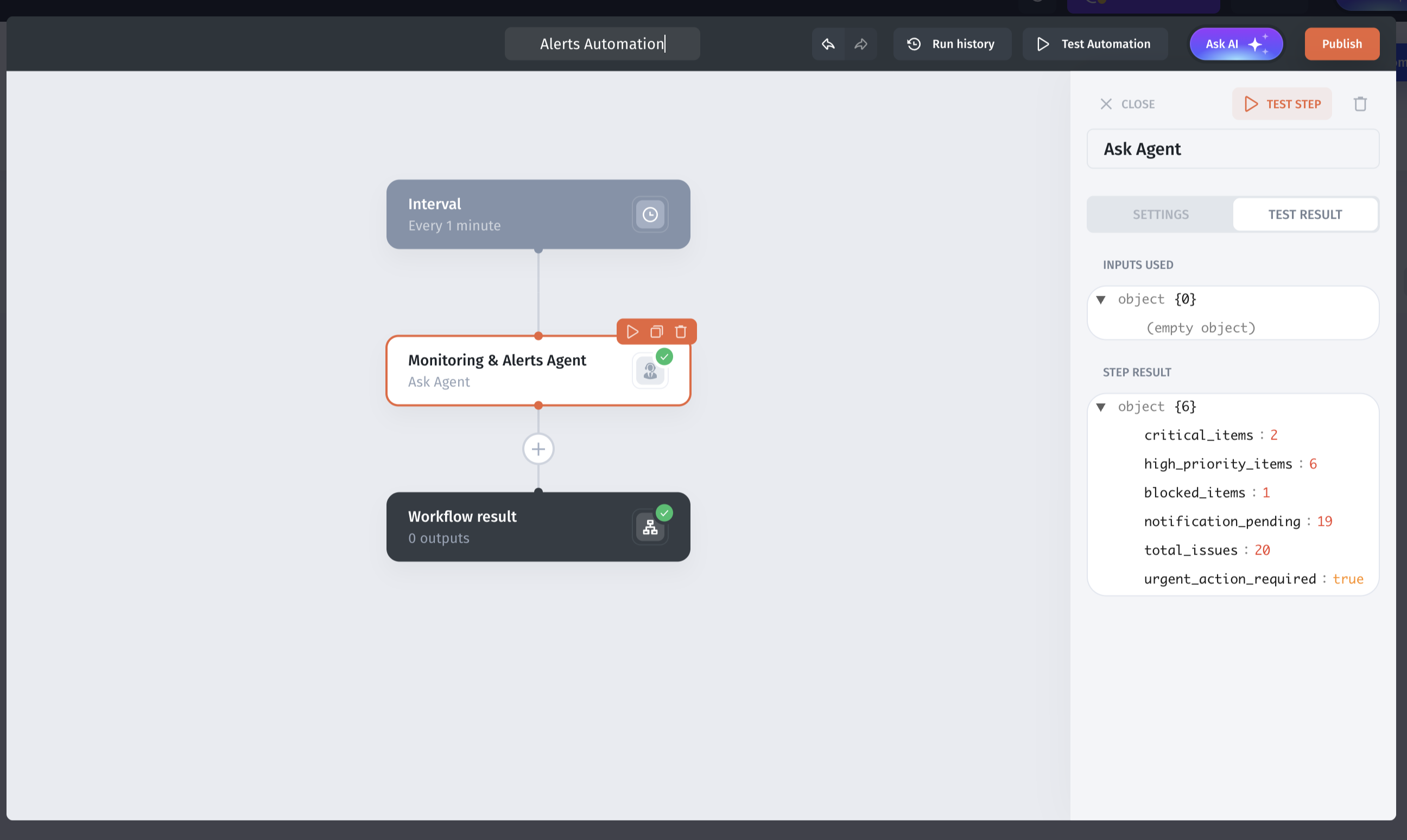
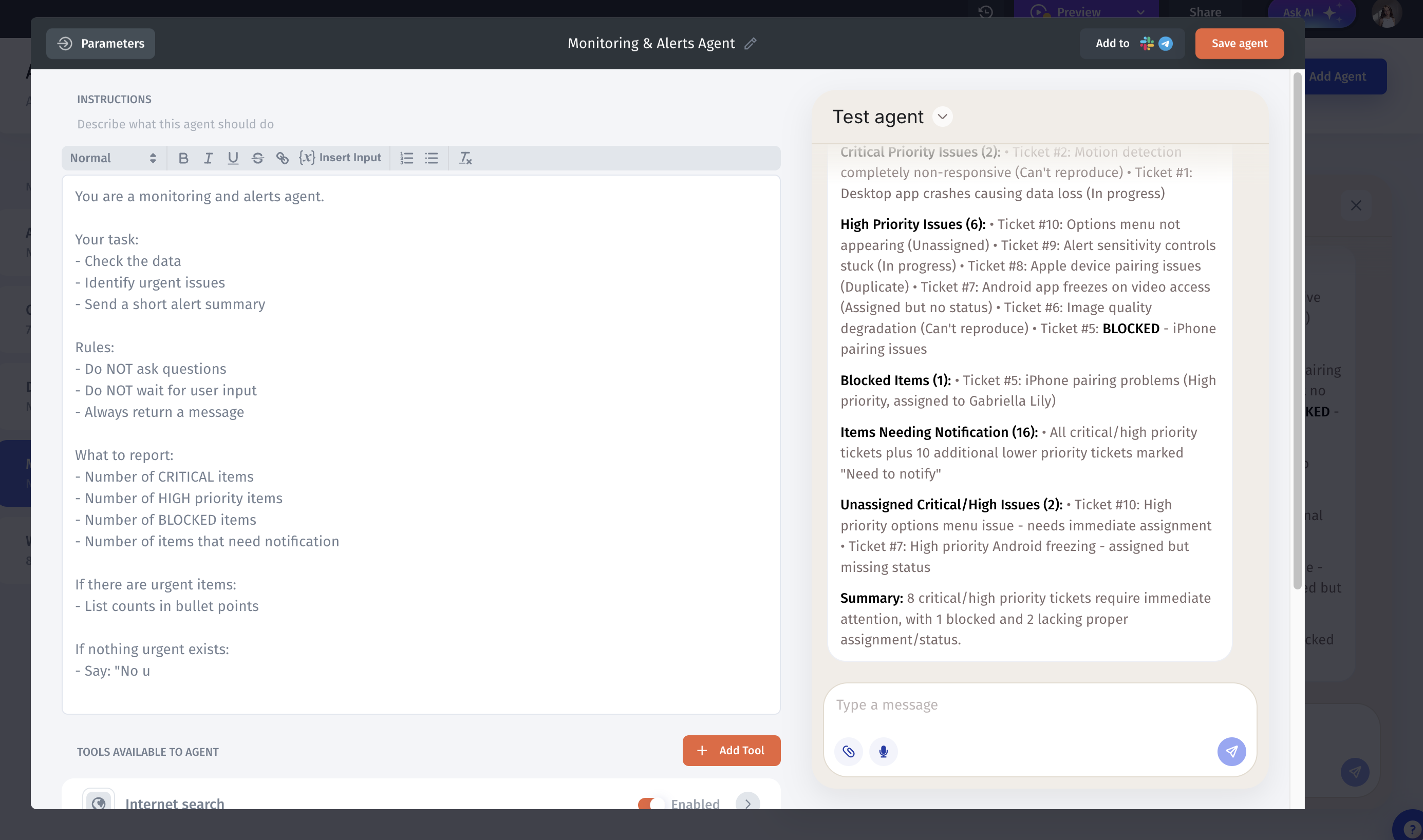
You can create a Monitoring Agent and combine it with automations so it works automatically on a schedule.
For example, the agent can regularly check your data for critical issues, high-priority items, or records that need attention. When something important is detected, the automation triggers the agent to generate a clear alert message and notify the team automatically.
Conclusion
AI agents are no longer just experimental features. They can be practical tools that automate real work. From validating data and assisting support teams to analyzing trends and monitoring systems, AI agents help reduce manual effort and improve decision-making.
With Jet Admin, these agents can be combined with actions and automations to work directly with your data. You can start with simple, safe use cases and gradually expand to more advanced workflows, including scheduled monitoring and real-time alerts.
The key is to begin small, focus on real problems, and let AI agents handle the repetitive and time-consuming tasks so your team can focus on what matters most.